Field Ops — Part of CrewMotive

Run Your Whole Crew From A Phone

Clock-ins, job schedules, field photos, and payroll-ready hours — all in one app so simple your crew will actually use it. No more napkins, group texts, or chasing down hours at the end of the week. Field Ops is built right into CrewMotive.

One App Time, jobs, photos & payroll-ready hours
No Training If your crew can text, they can use it
One System Built right into CrewMotive
In The Field Running real crews right now
01 Start The Day

Your Crew Clocks In From The Field

Crews open Field Ops on their phone, see the day's jobs with the address and scope, and tap once to start the day. Directions are one more tap. No paper timesheets, no guessing where anybody is.

  • One-tap clock in and clock out
  • Today's jobs, addresses, and scope
  • Directions to the next job
  • Works on any phone — nothing to install
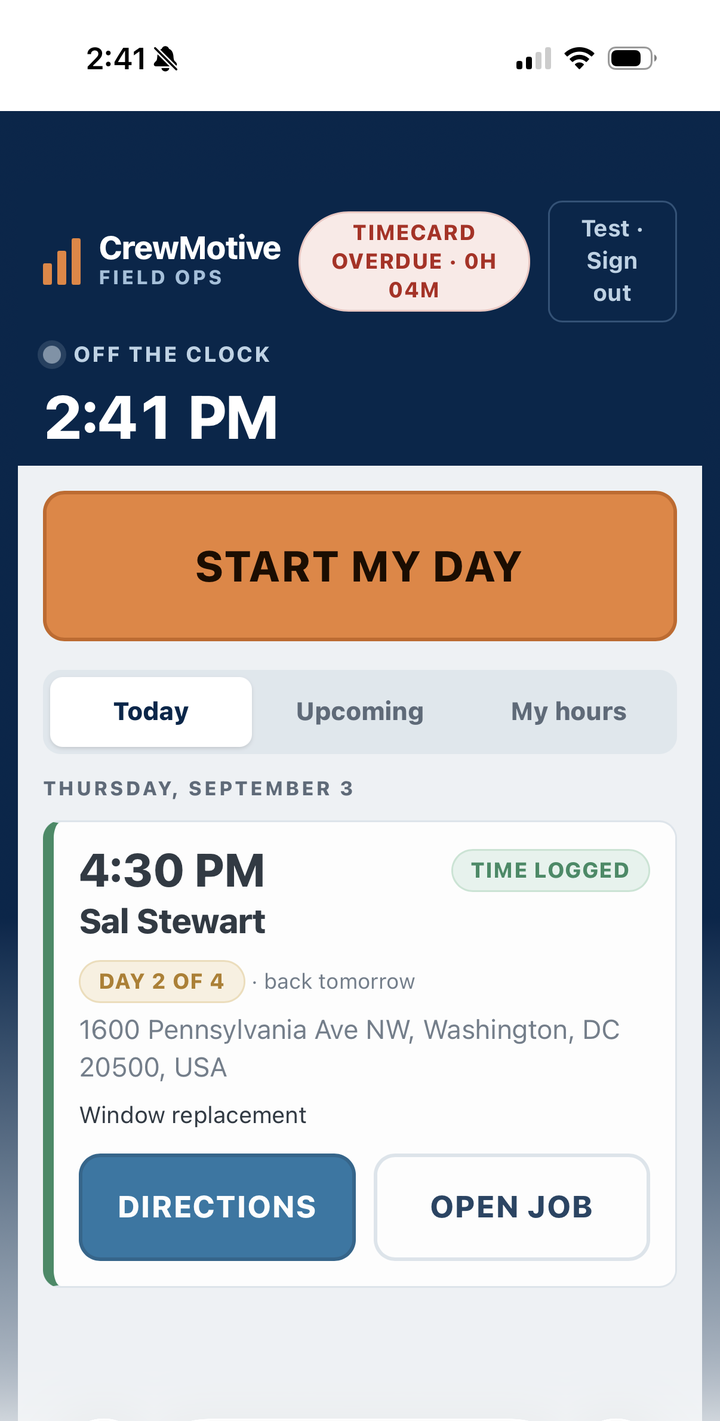
If they can send a text, they can run their whole day in Field Ops.
CrewMotive Field Ops crew app showing today's job schedule with a one-tap start the day button
02 On The Job

Every Job, Photo & Report In One Place

Crews snap job photos right from their phone and leave a quick report from the field — typed or by voice. It all lands back in the office attached to the job, so you see what happened without a single phone call.

  • Job photos straight from the crew's phone
  • Field reports by text or voice-to-text
  • Everything saved to the right job
  • The office sees it the moment it's sent
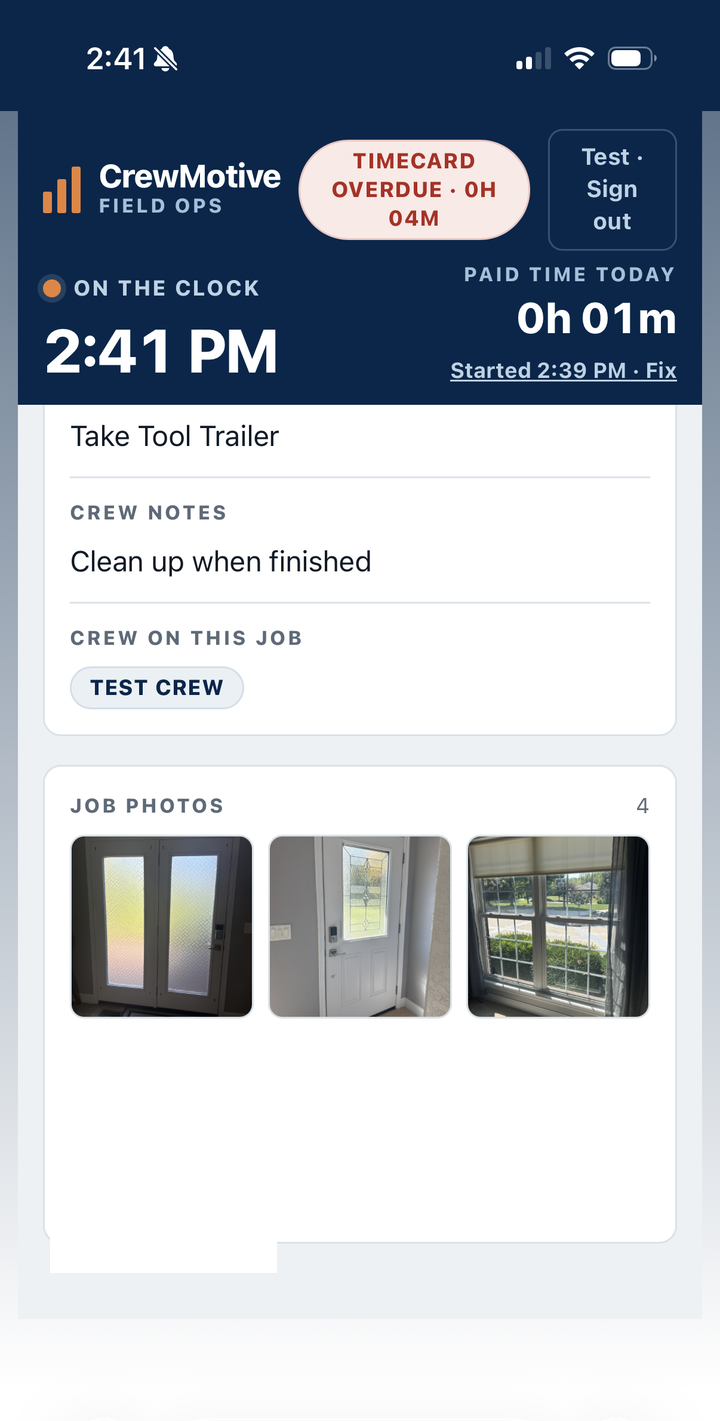
No more "send me the pictures" — they're already on the job.
CrewMotive Field Ops job screen showing crew notes and job photos captured from the field
Back At The Office

Hours Come Back Payroll-Ready

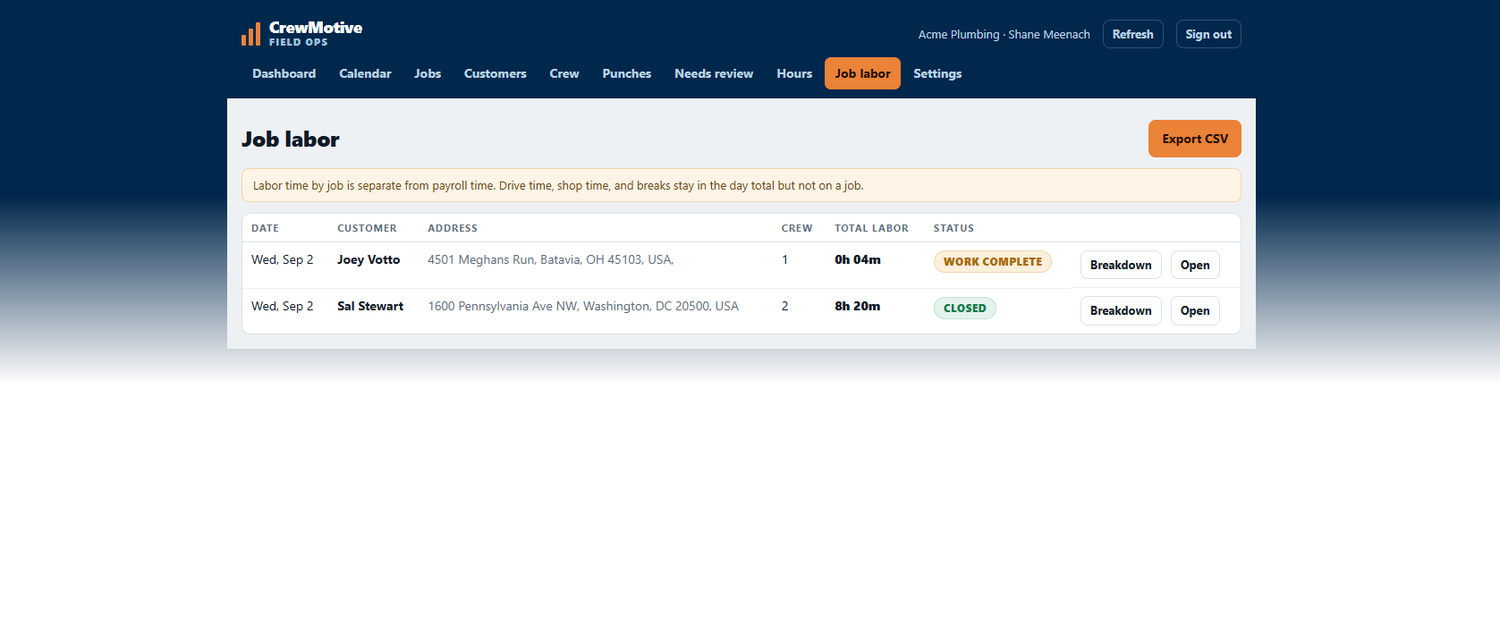
Every clock-in adds up automatically into hours by job and hours for payroll. Review the week, catch anything that needs a second look, and export — instead of building payroll by hand from napkins and memory.
ops.crewmotive.com
CrewMotive Field Ops admin job labor view showing hours by job, ready for payroll export
Friday payroll goes from an afternoon to a few minutes.
Field Ops Media Engine

Turn Job Photos Into Posts That Bring Work

The photos your crew already takes become a ready-to-post social update — written for you with your city and service, built from the job itself, never a customer's address. You approve it before anything goes out.

  • Captions written for you — city and service included
  • Built from the real job photos your crew took
  • You approve every post before it publishes
  • Never posts a customer's home address
Nothing posts without your say-so.
Social media post automatically created from CrewMotive Field Ops job photos, waiting for owner approval before it publishes
What's Included

Everything Your Crew Needs, Nothing They Don't

Field Ops sticks to the handful of things that actually run a job — so your crew will actually use it.

1

Crew Clock-In

One-tap start and end of day from any phone, with hours that add up on their own.

2

Job Scheduling

Assign crews, dates, and job details so everyone knows where to be and what to do.

3

Field Photos

Job photos straight from the crew's phone, saved to the right job automatically.

4

Job Reports

Quick notes from the field — typed or by voice-to-text — sent to the office.

5

Payroll-Ready Hours

Time by job and time for payroll, ready to review and export at the end of the week.

6

CRM Sync

Customers and jobs flow between Field Ops and CrewMotive — one system, not two.

The Difference

The Napkin Way vs. Field Ops

Running It On Paper
  • ✗ Hours scribbled on napkins and truck notes
  • ✗ "How many hours did you work?" every Friday
  • ✗ Job photos lost in random group texts
  • ✗ Payroll built by hand from memory
  • ✗ A separate app bolted on for the field
Running It On Field Ops
  • ✓ Crew clocks in and out from their phone
  • ✓ Hours add up on their own, ready for payroll
  • ✓ Every job photo saved to the job
  • ✓ Reports from the field land in the office instantly
  • ✓ One system — field ops built into CrewMotive
FAQ

Field Ops Questions

Field Ops is the field side of CrewMotive — a simple app your crew uses to clock in, see their jobs, take job photos, and leave reports from the field. Their hours come back to the office payroll-ready, and it's built into CrewMotive, so your crew, customers, and jobs all live in one system.
No. Field Ops runs in the phone's web browser at ops.crewmotive.com — your crew opens the link and logs in with a PIN. They can add it to their home screen so it opens like a normal app. There's nothing to download from an app store and nothing to keep updated.
Crews open Field Ops, see the day's jobs, and tap once to start the day. Time adds up automatically as they work, including time by job. At the office, those hours come back organized and ready to review — so you're not rebuilding timesheets from notes at the end of the week.
Yes. Crews snap photos right from their phone and leave a quick report — typed or by voice-to-text — and it all lands back in the office attached to the right job. You can see what happened on site without calling anyone or waiting on a group text.
Yes. Every clock-in rolls up into hours for payroll and hours by job. You review the week, catch anything that needs a second look, and export. It replaces adding up hours by hand, so payroll takes minutes instead of an afternoon.
Yes. With the Media Engine, the photos your crew takes become a ready-to-post social update, with a caption written for you using the job and your city. You approve or reject every post before it publishes — nothing goes out without your say-so.
Field Ops and CrewMotive share the same customers and jobs. Move a customer into a job and it shows up for the crew; a customer added in the field shows up in your CRM. It's one system, so your marketing, your customers, and your field crew aren't living in separate tools.
That's the whole point. Field Ops was built to be as simple as the napkin or group text it replaces — big buttons, one job at a time, and a PIN to log in. If your crew can send a text message, they can run their day in Field Ops. No training class required.
See It In Action

Put Down The Napkin

See Field Ops running inside CrewMotive. Book a free strategy call and we'll show you exactly how it fits your crew.

Book My Free Strategy Call Built for home-service & trade contractors